The Beelink SER8 has become one of the reference mini PCs of the Ryzen 7 class. It combines a full-power eight-core processor, one of the best integrated GPUs of its generation, upgradeable DDR5 and fast storage in an elegant metal box that is quieter than most rivals. The version with the Ryzen 7 8745HS keeps everything that made the SER8 popular but drops the NPU, which changes the value equation.
8745HS vs 8845HS: what you lose
The 8745HS and 8845HS share the same eight Zen 4 cores, the same clocks (up to 4.9 GHz in Beelink’s configuration) and the same Radeon 780M graphics. The only real difference is that the 8745HS has its NPU disabled. For most users that changes nothing: the 16-TOPS NPU of the 8845HS was never enough for Copilot+ certification anyway, and local AI tools rely on the CPU and GPU. If you do not specifically need the NPU, the 8745HS gives identical day-to-day performance.
Performance in practice
Running at a sustained 65 W, the SER8 extracts the full multi-core performance of its chip. Beelink quotes around 6,600 points in Cinebench R20 multi-core. Large spreadsheets, dozens of browser tabs, code compilation, Lightroom and consumer video editing all run smoothly. It also makes an excellent home-lab machine: eight cores, sixteen threads and upgradeable memory leave room for several virtual machines or a stack of containers.
Gaming with the Radeon 780M
The Radeon 780M brings real gaming capability to a small box. Esports titles such as Dota 2, League of Legends or CS2 run at high frame rates at 1080p, and many recent games are playable at 1080p with low to medium settings and upscaling. The rear USB4 port also opens the door to an external GPU dock for a much bigger upgrade — our eGPU guide explains the options and their limits over USB4.

Memory and storage: easy to upgrade
Both memory and storage are standard parts. The two DDR5 SO-DIMM slots come with 32 GB at 5600 MT/s in dual channel, and can be upgraded; Beelink lists up to 256 GB, which we could not verify, so plan on 2× 64 GB as the practical ceiling. The 1 TB PCIe 4.0 SSD can be joined by a second PCIe 4.0 drive, each slot running at full ×4 speed. Opening the chassis is straightforward, and the SSD area has its own heatsink.
Connectivity
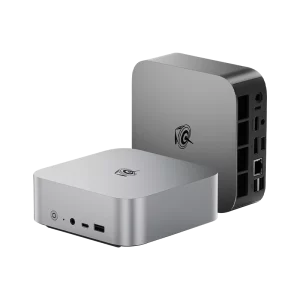
The SER8 covers the essentials well: USB4 at 40 Gbps with display output and Power Delivery, HDMI 2.1 for 4K at 120 Hz, DisplayPort 1.4 for 4K at 144 Hz, 2.5 Gigabit Ethernet with Wake-on-LAN, Wi-Fi 6 and Bluetooth 5.2. The front offers a 10 Gbps USB-C (data only) and a 10 Gbps USB-A, both convenient for fast flash drives. The weak point is that two of the four USB-A ports are USB 2.0, and there is only one Ethernet port. If you need more ports, Beelink’s Mate SE dock stacks under the SER8 and matches its design.
Cooling and noise
Noise is where the SER8 stands out. Beelink’s MSC 2.0 system uses a vapor chamber, a large quiet fan and an SSD heatsink, drawing air from the bottom through a metal dust filter and exhausting at the back. At idle and in office work it is practically inaudible; under sustained load the fan rises to a soft, even sound rather than a whine. The metal case also helps dampen noise. This makes the SER8 a good fit for a home office, a living room or a bedroom desk.
Design
At 135 × 135 × 44.7 mm and around 750 g, the SER8 has a clean, vent-free top and sides, available in Frost Silver or Space Gray. There is no VESA mount, so it sits on the desk rather than behind a monitor. Beelink backs it with a three-year warranty, longer than many competitors.
Software, Linux and everyday use
The SER8 ships with Windows 11 Pro activated, and the AMD platform is also well supported on Linux: distributions such as Ubuntu, Fedora or Linux Mint recognise the Radeon 780M, the 2.5GbE controller and the storage out of the box, while the Wi-Fi module benefits from a recent kernel. This makes the SER8 a natural choice for a dual-boot developer machine or a Proxmox host, using the second M.2 slot for a separate system or for virtual machine storage. Auto power-on after a power cut and Wake-on-LAN are useful when the computer runs as a server in a cupboard.
As a media centre, the SER8 decodes 4K HEVC, VP9 and AV1 in hardware and can drive a 4K TV at 120 Hz over HDMI 2.1, with multichannel audio passed to an AV receiver. Users of high-end TVs should know that HDR compatibility over HDMI can depend on the specific TV and driver version; the DisplayPort or USB4 output with a suitable adapter is an alternative if problems appear.
Upgrade tips
For most users, 32 GB is the right amount. Moving to 64 GB (2× 32 GB) is worthwhile for virtual machines, large photo catalogues or local language models; always install memory in matched pairs to keep dual channel. For storage, the free PCIe 4.0 slot is ideal for a second NVMe drive dedicated to games, media or backups. Our step-by-step guides to upgrading RAM and SSDs in a mini PC cover both operations.
Price and alternatives
Beelink lists the SER8 8745HS at US $1,099 with 32 GB and 1 TB in its own store (November 2026), a price driven up by memory costs; retailers often sell it for less, so compare before buying. Among direct rivals, the Bosgame M4 uses the same 8745HS and adds OCuLink for external GPUs, the GEEKOM A8 Max and MINISFORUM UM870 Plus offer the same class of chip with different port layouts, and the GMKtec NucBox K8 Plus uses the 8845HS with its NPU. If you want Copilot+ features, look at Ryzen AI 300 models such as Beelink’s SER9 Pro instead.
How it compares with the SER8 8845HS
Beelink also sells the SER8 with the Ryzen 7 8845HS. Chassis, ports, cooling and memory are identical; the only practical difference is the 16-TOPS NPU of the 8845HS, which is too small for Copilot+ certification and is rarely used by Windows applications today. Unless you have a specific program that uses the Ryzen AI engine, the 8745HS is the more sensible purchase whenever it is the cheaper of the two.
Who should buy it?
The SER8 suits users who want a fast, quiet and upgradeable desktop for work, creative tasks and casual gaming, and home-lab users who value eight cores and expandable memory. It is less suitable for those who need Copilot+ AI features, dual Ethernet for router or firewall projects, or a VESA-mounted computer.
Verdict
The Beelink SER8 with the Ryzen 7 8745HS remains one of the most balanced mini PCs in its class: full 65 W performance, excellent integrated graphics, standard upgradeable components and exceptionally quiet cooling. The missing NPU matters little in practice. Its main drawbacks are the two USB 2.0 ports, the single Ethernet port and an official price that only makes sense when retailers discount it.
| AI Capabilities | ||||||||||||||
|---|---|---|---|---|---|---|---|---|---|---|---|---|---|---|
|
||||||||||||||
| Processor | ||||||||||||||
|
||||||||||||||
| Ports | ||||||||||||||
|
||||||||||||||
| Network | ||||||||||||||
|
||||||||||||||
| GPU | ||||||||||||||
|
||||||||||||||
| Internal Ports | ||||||||||||||
|
||||||||||||||
| Storage & RAM | ||||||||||||||
|
||||||||||||||
| Power | ||||||||||||||
|
||||||||||||||
| Others Specifications | ||||||||||||||
|
||||||||||||||
| Specification | ||||||||||||||
|
||||||||||||||


More information: Beelink SER8 on minis-pc.com
Discover our full Mini PC comparison: minis-pc.com
Article written for minis-pc.com — Mini PC Comparisons and Reviews
Our 2026 Buying Guides & Deals
Disclaimer: This article is for information purposes only. Specifications, prices, coupons and availability may change at any time or contain errors, so please check them on the manufacturer's official website or store before buying. Some links on this page are affiliate links: if you buy through them we may earn a small commission at no extra cost to you.