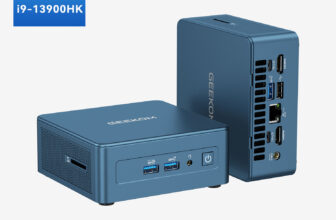
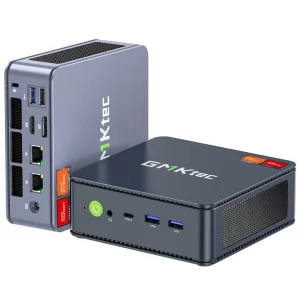
The GMKtec NucBox K6 takes a proven recipe — AMD’s Ryzen 7 7840HS with Radeon 780M graphics — and adds something many rivals leave out: two 2.5 Gigabit Ethernet ports. Combined with two PCIe 4.0 M.2 slots, USB4 and the option to buy it as a barebone, it is one of the most flexible mini PCs of its class, equally at home on an office desk and in a home lab.
A proven processor
The Ryzen 7 7840HS belongs to AMD’s Phoenix family: eight Zen 4 cores, sixteen threads, boost up to 5.1 GHz and 24 MB of total cache on a 4 nm process. GMKtec runs it at up to 65 W, which lets it deliver practically the same performance as the newer Ryzen 7 8845HS. For everyday work, programming, photo editing and consumer video editing, it is more than enough, and it remains comfortable with several virtual machines.
The NPU: present, but limited
The 7840HS includes AMD’s first-generation Ryzen AI engine, rated at up to 10 TOPS. It accelerates Windows Studio Effects such as background blur and eye contact in video calls, and a few AMD-optimised applications, but it is far below the 40 TOPS needed for Copilot+ certification. In practice, local AI tools like Ollama or LM Studio run on the CPU and GPU, where 32 GB or 64 GB of DDR5 matters more than the NPU. That is why we classify the K6 among AI-capable mini PCs, while making clear that it is not a Copilot+ PC.
Gaming with the Radeon 780M
The Radeon 780M remains one of the best integrated GPUs available in this price range. Esports games such as League of Legends, Valorant, Dota 2 or CS2 run smoothly at 1080p, and many recent titles are playable with low to medium settings and FSR upscaling. Dual-channel memory is key, so make sure two modules are installed. For more graphics power, the USB4 port can connect an external GPU dock, although GMKtec’s own specification sheet lists the port at up to 20 Gbps, which would limit eGPU performance compared with a full 40 Gbps port.

Dual 2.5GbE: the home-lab advantage
Two 2.5 Gigabit Ethernet ports change what the K6 can do. It can act as a router or firewall with OPNsense or pfSense, separate a LAN and a WAN, run Proxmox with a dedicated network for virtual machines, or connect to a NAS on one port and the main network on the other. Combined with eight cores and up to 64 GB of DDR5, it is a powerful base for a home lab that still fits on a shelf. Our guide to using a mini PC as a home server covers these uses in more detail.
Memory and storage
Everything is upgradeable. The two DDR5-5600 SO-DIMM slots accept up to 64 GB, and the two M.2 2280 PCIe 4.0 slots accept NVMe drives for up to 4 TB according to GMKtec (SATA drives are not supported). The barebone version is a real advantage for users who already have memory and SSDs or want to choose their own brands; pre-configured versions with 16 GB + 1 TB, 32 GB + 1 TB and 32 GB + 2 TB are also offered.
Other connectivity
Wi-Fi 6 with a MediaTek RZ616 module and Bluetooth 5.2 handle wireless connections. Two 10 Gbps USB-A ports at the front are convenient for flash drives, and the rear adds another 10 Gbps USB-A, a USB 2.0 port for a keyboard or mouse, HDMI 2.0, DisplayPort and USB4 with Power Delivery up to 100 W. Three displays are supported at up to 4096 × 2160. HDMI 2.0 limits 4K output to 60 Hz on that port; DisplayPort or USB4 are better for high-refresh 4K monitors.
Cooling, noise and design
The K6 uses a conventional fan and heatsink. At light loads it is quiet; under sustained 65 W loads, the fan is clearly audible, which is common in mini PCs of this size and power. The 128.8 × 127 × 47.8 mm chassis weighs about 520 g, comes in dark or light blue and includes a VESA mount, so it can disappear behind a monitor. Warranty is one year, shorter than the three years offered by some rivals.
Software and Linux
Pre-configured versions include Windows 11 Pro, and GMKtec also lists Linux support. The AMD platform works well with modern Linux distributions; the MediaTek Wi-Fi module benefits from a recent kernel, and the two 2.5GbE ports are well suited to router and server distributions.
Which version to buy
The barebone makes sense if you already own DDR5 SO-DIMMs and an NVMe SSD, or want premium components: two 16 GB modules and a 1 TB PCIe 4.0 drive bring it close to the pre-configured price, with the parts of your choice. The 32 GB + 1 TB version is the best balance for most buyers, and the 2 TB version suits media libraries and game collections. Avoid running a single memory module, which halves memory bandwidth and noticeably reduces graphics performance. If you plan to use the K6 as a router or firewall, 16 GB is plenty; for virtual machines or local language models, aim for 64 GB.
Prices change often for this model, and in November 2026 GMKtec’s own store lists every version as unavailable, so check current retailer prices before deciding — and compare with the newer 8845HS and Ryzen AI 300 models, which sometimes sell for little more.
Alternatives
The Beelink SER8 offers similar CPU performance with quieter cooling, a full 40 Gbps USB4 port and a three-year warranty, but only one Ethernet port and no NPU. The GMKtec NucBox K8 Plus moves to the Ryzen 7 8845HS with a 16-TOPS NPU and OCuLink. The AYANEO AM02 uses the same 7840HS in a retro-styled chassis. For Copilot+ features, Ryzen AI 300 models such as the Beelink SER9 Pro are the next step up.
Who should buy it?
The K6 is a strong choice for home-lab enthusiasts, router and firewall builders, developers and anyone who wants a capable Ryzen 7 desktop with the freedom to choose their own RAM and SSD. Users who want silence under heavy load, a long warranty, HDMI 2.1 or Copilot+ features should look at the alternatives above.
Verdict
The GMKtec NucBox K6 is a versatile, well-equipped mini PC. Its Ryzen 7 7840HS and Radeon 780M remain very capable, and the dual 2.5GbE ports, two PCIe 4.0 slots and barebone option give it flexibility that few rivals match. Its weaker points are the audible fan under load, the short warranty and the unclear USB4 bandwidth — and, in November 2026, availability, since GMKtec’s own store lists it as out of stock.
| AI Capabilities | ||||||||||||||
|---|---|---|---|---|---|---|---|---|---|---|---|---|---|---|
|
||||||||||||||
| Processor | ||||||||||||||
|
||||||||||||||
| Ports | ||||||||||||||
|
||||||||||||||
| Network | ||||||||||||||
|
||||||||||||||
| GPU | ||||||||||||||
|
||||||||||||||
| Internal Ports | ||||||||||||||
|
||||||||||||||
| Storage & RAM | ||||||||||||||
|
||||||||||||||
| Power | ||||||||||||||
|
||||||||||||||
| Others Specifications | ||||||||||||||
|
||||||||||||||
| Specification | ||||||||||||||
|
||||||||||||||




More information: GMKtec NucBox K6 on minis-pc.com
Discover our full Mini PC comparison: minis-pc.com
Article written for minis-pc.com — Mini PC Comparisons and Reviews
Our 2026 Buying Guides & Deals
Disclaimer: This article is for information purposes only. Specifications, prices, coupons and availability may change at any time or contain errors, so please check them on the manufacturer's official website or store before buying. Some links on this page are affiliate links: if you buy through them we may earn a small commission at no extra cost to you.